


Gacha Life 2
4.115.11K Reviews
App Specs
- Version
- 0.96
- Updated On
- License
- Free
- Downloads
- 10,000,000+
- Developer
- Lunime
- Categories
- Casual
- Platform
- Android, iOS
Screenshots
 Analysis by AppCompare
Hey there! Today, I'm diving into the colorful and creative world of Gacha Life 2. If you're a fan of anime-style games where you can let your imagination run wild, you might want to stick around for this one.
A playful first impression
My first impression is that this casual game is less about chasing a finish line and more about settling in with an idea and seeing where it goes. Lunime gives the screen a bright anime look, and the overall presentation makes character creation feel approachable rather than like a complicated design tool. The game is free, rated Everyone, and has a 4.2 average from around 272,000 ratings, so it has clearly found a broad audience among players looking for a light creative pastime.
That easygoing feel suits short sessions, but it can also invite longer ones. I might open it intending to adjust one character and then find myself comparing hairstyles, outfits, and expressions until the original plan has changed completely. The appeal is not a demanding plot or a difficult challenge; it is the pleasure of making a design feel like mine. If that kind of open-ended tinkering sounds relaxing, the game has a clear point of entry.
Getting Started with Gacha Life 2
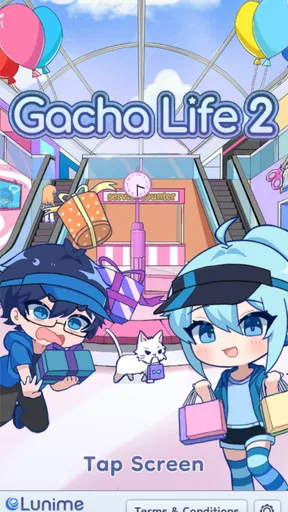
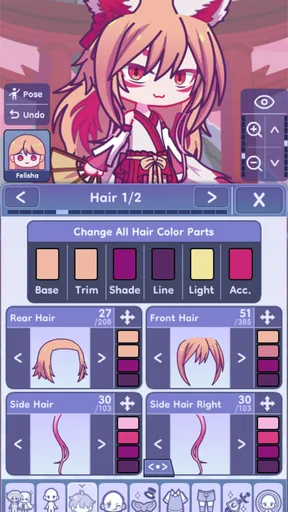
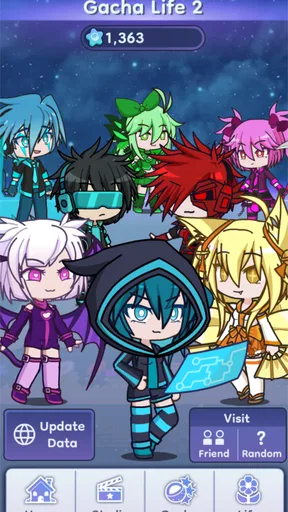
So, what's the deal with Gacha Life 2? If you’re familiar with the first game, you’ll know it’s all about creating unique characters and scenes using a vast selection of outfits, hairstyles, and accessories. This sequel takes everything we loved about the original and cranks it up a notch. As soon as you launch the app, you’re greeted with vibrant graphics and an intuitive interface that just screams fun.
Customization Galore
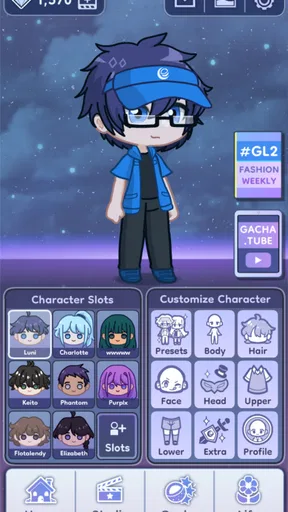
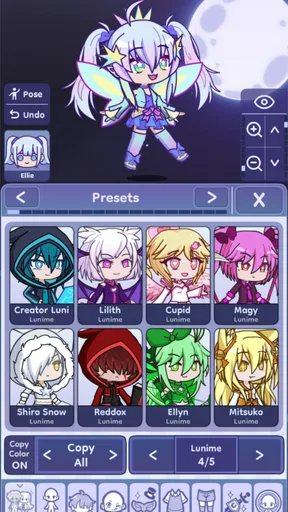
Customization is the name of the game here. You can tweak your character's appearance to your heart’s content. I spent ages just playing around with the different features. Want pink hair with polka dots? You got it! Maybe a ninja costume paired with bunny ears? No problem. The sheer variety of options is mind-boggling. Plus, the ability to create and save multiple characters means you can have a whole entourage of quirky avatars if that’s your thing.
Making a look feel intentional
The freedom to mix unusual details is fun, but it also creates a small design challenge: a character can quickly become a pile of options rather than a recognizable person. I get better results when I choose a simple idea first, such as a shy student, a dramatic performer, or a fantasy traveler, and then make each visual choice support it. Picking a main color and repeating it in a smaller accessory is an easy way to make an outfit feel deliberate without losing the playful mix-and-match quality.
For a practical workflow, I would finish one character’s silhouette before fussing over tiny details. Hair shape and clothing establish the overall impression; accessories and facial touches are easier to judge once those larger choices are settled. If I keep changing everything at once, it becomes hard to tell which adjustment actually improved the design. Saving different characters also makes it easier to build a cast with contrasting personalities instead of repeatedly reshaping one avatar.
Worth Reading Before You Choose

EA SPORTS FC Mobile 26 Is a Bigger Football Game, but It Takes Time

Flipboard Shows What News Apps Must Do Beyond the Feed

Switching to Android Auto Means Rethinking Your Driving Routine

Google Calendar Makes a Crowded Week Easier to Manage

Ludo King Makes the Most of the Minutes Between Plans

Baby Panda World Brings Quick Play to Modern Phones, but Its Game Library Feels Busy
Creating Stories and Scenes
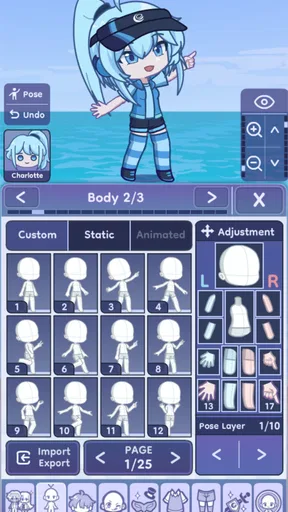
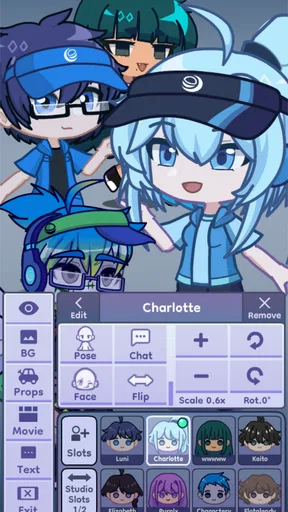
Once you've crafted your perfect character, it’s time to put them into action. The game allows you to create scenes using various backgrounds and props. You can set the mood with different poses and expressions, making it feel like you’re directing your own mini anime series. And trust me, seeing your characters come to life in these scenes is super satisfying.
Small scenes with a clear idea
Scene-making works best for me when I treat a background, pose, and expression as parts of one moment rather than as decorations chosen independently. A character looking startled needs a different visual setup from one calmly posing for a portrait. Even a simple two-character exchange can suggest a story if their expressions and positions make their relationship legible. That makes the scene tools useful for more than elaborate fan stories: they can also turn a character design into a profile image or a quick visual joke.
There is a trade-off, though. A scene creator gives you room to stage an idea, but it does not do the storytelling for you. If you want a game that supplies a long campaign, guided objectives, or a traditional progression loop, this is not the same kind of experience. I would approach it as a small creative workspace: decide what the image should communicate, then use the available characters and scene elements to make that point clear.
Sound and the pace of play
The game’s mood is shaped more by its cheerful visual language and the player’s own experiments than by a dramatic, plot-led pace. Mini-games offer a change of activity, while customization and scene building encourage slower, self-directed sessions. I would not choose it primarily for a deep soundscape or a tightly scored adventure; the strongest reason to stay is the visual making. That balance is useful if you want something you can pick up without needing to remember where a complicated story left off.
For an everyday example, I can imagine opening it during a quiet break, adjusting a character’s outfit for a few minutes, then returning later to place that character in a scene with a different expression. The lack of pressure is a strength when I want a low-stakes creative distraction. It can be less satisfying if I am looking for constant new challenges, a strong narrative hook, or play that depends on mastering difficult mechanics.
Mini-Games for Extra Fun
Gacha Life 2 isn’t just about character creation; it also offers a range of mini-games to keep things interesting. Whether you’re in the mood for a quick puzzle or a rhythm game, there’s something here to satisfy your gaming itch. These mini-games are a great way to earn in-game currency, which you can then spend on even more customization options. It’s a win-win!
When the mini-games fit
The mini-games are a useful change of pace when I want an activity with a clearer start and finish than open-ended styling. They make the experience feel less like a single-purpose dress-up tool, but I would still treat them as a side dish rather than the main reason to play. If your favorite casual games are built around increasingly demanding levels or a deep competitive loop, these short diversions may not hold your attention for long.
One sensible way to use them is to switch over when you have run out of ideas for a character, then return to customization with a fresh eye. That keeps the creative part from feeling like an endless sequence of tiny edits. It also helps set expectations: the game’s most distinctive pleasure is making and arranging anime-style characters, while the mini-games add variety around that core rather than replacing it.
Who will enjoy this creative loop
I would recommend it most to players who like designing characters, inventing personalities, or arranging visual scenes at their own pace. It can also work well for someone who wants a casual game they can revisit in short bursts, or for friends who enjoy comparing original character concepts and sharing inspiration. With more than 10 million installs, it has reached plenty of players, but its broad audience does not mean every casual gamer will find the same things engaging.
On the other hand, I would steer away from it if you want a focused action game, a structured story with a defined ending, or a robust drawing app where you create every visual element from scratch. The appeal here is working within a character-and-scene format, not having unlimited control over every pixel. Players who dislike spending time on cosmetic decisions may also find the central activity repetitive, even though the range of combinations gives patient creators plenty to explore.
Social Interaction and Sharing
What’s the point of creating awesome characters and scenes if you can’t share them with the world, right? The app makes it easy to share your creations with friends or even the wider community. You can also see what others have made, which is a fantastic way to get inspired and maybe even pick up a few tips and tricks.
Sharing with a purpose
For me, sharing is most rewarding when I have a specific reason to show something: a finished character, a scene with a small visual punchline, or a design experiment I want a friend to react to. Looking at other creations can also help me notice combinations I would not have tried, then adapt the underlying idea rather than copy a whole look. That makes community inspiration useful as a prompt for my own work, especially when I have fallen into choosing the same kinds of outfits.
I would still keep expectations grounded. Sharing can add an audience to a creative hobby, but it does not automatically make the game a social network or guarantee meaningful feedback on every creation. If I mainly want private, personal character design, I can enjoy the creative tools without making community interaction the focus. If I want a game centered on chatting or social play, I would choose something built around those activities instead.
What to expect before installing
The game is free, and its current version is 0.96; it runs on Android 5.0 or later. Those details make it straightforward to consider on a compatible device, while the Everyone age rating reflects its broad, casual positioning. The important choice is less about the entry cost and more about whether you enjoy the central loop: making characters, refining their looks, and arranging them into scenes. I would go in expecting a creative playground, not a conventional story game.
Compared with a typical dress-up game, this one gives more weight to assembling characters and placing them into scenes, so it suits players who want their outfits to imply a personality or a small story. Compared with a general-purpose art app, it is more guided and immediately playful, but less suited to someone who wants to draw freely from a blank canvas. That middle ground is its best fit: more expressive than choosing a single outfit, but more structured than open-ended illustration.
Is Gacha Life 2 for You?
So, who is this game for? If you love anime, enjoy creative expression, and have a penchant for storytelling, you’re going to get a kick out of Gacha Life 2. It’s perfect for both casual gamers and those who like to dive deep into customization. And with regular updates, there’s always something new to discover.
I would be more cautious about recommending it to someone who expects every session to introduce new content or steadily raise the difficulty. The open-ended nature means that the player supplies much of the motivation. A useful test is to ask whether you enjoy revisiting a design to make small improvements, or whether you would rather unlock a fixed sequence of stages. If you like iterative creative work, the freedom can be absorbing; if not, the lack of a strong external goal may make it easy to set aside.
As a casual game from Lunime, it has a focused identity and a welcoming starting point, even if its best moments depend on your own ideas. My advice is to begin with one character and one small scene rather than trying to build a whole cast immediately. That gives you a feel for the customization and presentation before you decide whether the wider creative loop suits you. The game has been available since October 10, 2023, and its appeal remains easiest to understand when you treat it as a place to make things, not as a challenge to complete.
All in all, Gacha Life 2 brings a delightful blend of creativity and fun. Whether you’re customizing characters, crafting stories, or connecting with other players, there’s plenty to keep you entertained for hours on end. So why not give it a go and see what kind of worlds you can create?
Pros
- Vast customization options for characters.
- Engaging mini-games enhance replayability.
- User-friendly interface for easy navigation.
- Offline mode available for gameplay.
- Regular updates with new content.
Cons
- Contains in-app purchases for premium items.
- Ads can interrupt gameplay experience.
- Limited storyline depth and variety.
- Some features require internet connection.
- May consume significant device storage.
FAQs for Gacha Life 2
What is Gacha Life 2, and how does it differ from the original Gacha Life?
Gacha Life 2 is the sequel to the popular Gacha Life game, enhancing the user experience with improved graphics, more customization options, and additional mini-games. Unlike the original, Gacha Life 2 introduces new features such as enhanced character animations and a wider variety of character items and accessories, providing a more immersive and engaging experience.
Are there any in-app purchases in Gacha Life 2?
Yes, Gacha Life 2 includes in-app purchases. While the game is free to download and play, certain items, accessories, and features can be purchased to enhance gameplay. These purchases are optional and designed to provide additional customization and quicker progression for players looking to enrich their gaming experience.
Is Gacha Life 2 appropriate for children?
Gacha Life 2 is generally considered suitable for a younger audience, but parents should be aware that it contains social interaction features. The game allows for creativity and storytelling, but parental guidance is recommended to monitor any online interactions and ensure a safe gaming environment for children.
What platforms is Gacha Life 2 available on?
Gacha Life 2 is available on both Android and iOS platforms, allowing a wide range of players to access the game. The app is downloadable from the Google Play Store and the Apple App Store, making it accessible to users of most smartphones and tablets. Ensure your device meets the necessary system requirements for optimal performance.
Can I transfer my progress from the original Gacha Life to Gacha Life 2?
Unfortunately, progress from Gacha Life cannot be directly transferred to Gacha Life 2. The sequel is a separate game with new features and content, requiring players to start fresh. However, this offers an opportunity to explore and enjoy the new elements and features that Gacha Life 2 brings to the table.


